Thunder: A Stylish Handwritten Font for Modern Creators
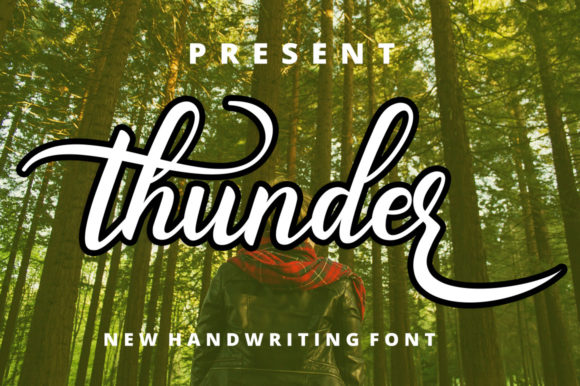
If you have ever felt that your digital designs lacked a personal touch, Thunder might be exactly what you need to bridge the gap between professional polish and human warmth. This is not just another generic script; it is a stylish and modern handwritten font that beautifully combines a flowing style with individually charming characters. Whether you are a seasoned graphic designer looking to add flair to a brand identity or a small business owner trying to make your social media posts stand out, this tool offers a unique solution.
The beauty of Thunder lies in its ability to feel spontaneous while remaining highly readable. It captures the essence of a quick, confident pen stroke on paper but translates that energy perfectly into the digital realm. For creators who want their work to look bespoke without spending hours hand-lettering every element, this font provides an immediate upgrade to the visual quality of your projects.
What Makes Thunder Unique?
When browsing through thousands of typefaces, it is easy to get overwhelmed by options that look too rigid or overly decorative. Thunder strikes a perfect balance. Its flowing style mimics natural handwriting, giving text a sense of movement and life. However, unlike some script fonts that become illegible when used in paragraphs, Thunder maintains clarity even at smaller sizes.
One of the most distinct features is how each character is crafted. The font does not rely on repetitive, robotic letterforms. Instead, it offers individually charming characters that vary slightly in shape and angle, much like a real person writing by hand. This variation prevents the design from feeling static or mass-produced. When you use Thunder, you are adding a layer of authenticity that resonates deeply with audiences who crave genuine connections in a world dominated by sterile, automated content.
The Power of PUA Encoding
For those who are less familiar with technical typography terms, understanding the encoding behind a font can seem daunting. However, the fact that Thunder is PUA encoded is a significant advantage for anyone using design software like Adobe Illustrator, Photoshop, or Canva. PUA stands for Private Use Area, a section of the Unicode standard reserved for custom characters.
This means you can access all of the glyphs and swashes with ease. In practical terms, swashes are the extra decorative flourishes that often accompany handwritten fonts—those elegant tails extending from letters like 'f' or 'y', or the loops on 'l' and 't'. With standard fonts, accessing these variations can sometimes require complex menu diving or manual adjustments. With Thunder, the PUA encoding ensures that these beautiful details are readily available, allowing you to mix and match styles effortlessly to create custom headlines that look professionally curated.
Who Benefits from Using This Font?
The versatility of Thunder makes it suitable for a wide range of users. You do not need to be a master typographer to achieve great results. Beginners will appreciate how easy it is to apply the font to projects to instantly elevate the aesthetic. Casual users can use it for personal invitations, photo captions, or blog headers without needing advanced skills.
For professionals, marketers, and entrepreneurs, the value lies in branding consistency. If you run a boutique, a coffee shop, or a creative agency, having a signature font helps establish a recognizable voice. Thunder works exceptionally well for logos, packaging labels, and promotional materials where a friendly yet sophisticated image is desired. Educators can also find uses for it in creating engaging worksheets or presentation slides that capture student attention better than standard serif or sans-serif fonts.
Real-World Applications
To visualize how this font fits into your workflow, consider these realistic scenarios:
- Social Media Graphics: Add a handwritten headline to Instagram stories or Pinterest pins to break up the monotony of blocky text.
- Event Invitations: Create elegant wedding, birthday, or corporate event invites that feel personal and warm.
- Product Packaging: Print labels for handmade goods, such as candles, soaps, or baked treats, to emphasize the artisanal nature of the product.
- Blog Headers: Use Thunder for post titles to give your website a distinct personality that encourages readers to stay longer.
- Freelance Portfolios: Incorporate the font into your resume or portfolio cover pages to showcase your design sensibility immediately.
How to Get Started with Thunder
Adding this lovely freebie to your creations is straightforward. Since it is a font file, you simply download it, install it on your computer (Mac or Windows), and it will appear in the font list of your favorite applications. Once installed, select the text box you wish to edit and choose Thunder from the dropdown menu.
Once you have selected the font, don't be afraid to experiment with the swashes. Try applying them to specific letters to see how they change the rhythm of the word. Because the font is PUA encoded, you should be able to toggle these variations directly within your software's glyph panel. This flexibility allows you to tailor the look of each headline to fit the specific mood of your project.
Things to Consider Before You Design
While Thunder is incredibly versatile, there are a few practical considerations to keep in mind to ensure your designs remain effective. First, remember that handwritten fonts are best used for display purposes rather than long blocks of body text. While Thunder is designed to be legible, reading a full article in a script font can cause eye fatigue. Use it for titles, quotes, and short phrases to let it shine.
Secondly, consider color contrast. Since the font has flowing lines and varying stroke widths, ensure that the background color provides enough contrast so the text remains crisp. High contrast usually yields the best results, especially if you are printing the material. Finally, test the font across different devices if you are using it for web design. Ensure that the rendering looks good on both mobile screens and desktop monitors, as the fine details of the swashes can sometimes get lost on very small displays.
Ultimately, Thunder is more than just a collection of letters; it is a tool for expression. By taking your designs to the next level with this font, you are making a statement about the care and creativity you put into your work. Whether you are launching a new startup, sharing a personal story, or simply trying to make your everyday documents look a little more special, this font offers the charm and professionalism you need to succeed.